


OpenSnap

A screenshot tool that feels like part of the screen

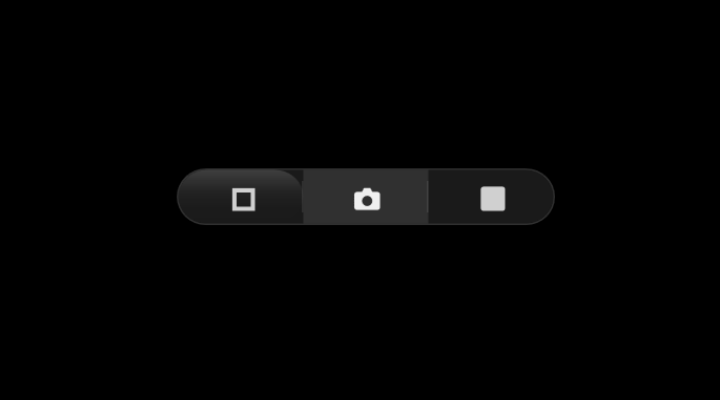
240 × 36 px floating glass capsule. One click, saved and copied. No login, no cloud, no telemetry.

Windows 10 / 11  ·  C# WPF  ·  .NET 8  ·  MIT License  ·  Microsoft Store
OpenSnap floating widget

Why OpenSnap

One-click capture

Full multi-monitor desktop, active window, or drag-select an area. All from the same floating pill.

OCR built in

Extract text from any screen region using Windows OCR. Copied to clipboard alongside the image.

Quick actions

After capture: copy, OCR, open in Paint, reveal in Explorer, or open with your preferred editor.

Global hotkeys

Win+Shift+S for full screen, Win+Shift+W for active window. Configurable in Settings.

Smart naming

Custom filename templates with project prefixes, sequential numbering, and date-based subfolders.

5 languages

English, French, German, Spanish, Japanese. Switch anytime in Settings.

← Back

About OpenSnap

Every screenshot tool is either bloated, buried in menus, or requires three clicks before you get an image. OpenSnap lives on your screen as a translucent glass capsule — click to capture, drag to move. That's it.

No login, no cloud, no telemetry. It saves to your Desktop and gets out of your way.

Design Philosophy

"A screenshot tool shouldn't feel like an application. It should feel like part of the screen."

Translucent glass, minimal footprint (240 × 36 px), always-on-top, and zero chrome. The widget is intentionally not an app window — it's a utility that sits at the edge of your workflow.

Built With

C# / WPF / .NET 8 — native Windows application. No web wrappers, no Electron, no unnecessary dependencies.

Part of Kovina

OpenSnap is part of the Kovina collection — minimal, focused tools for everyday tasks.